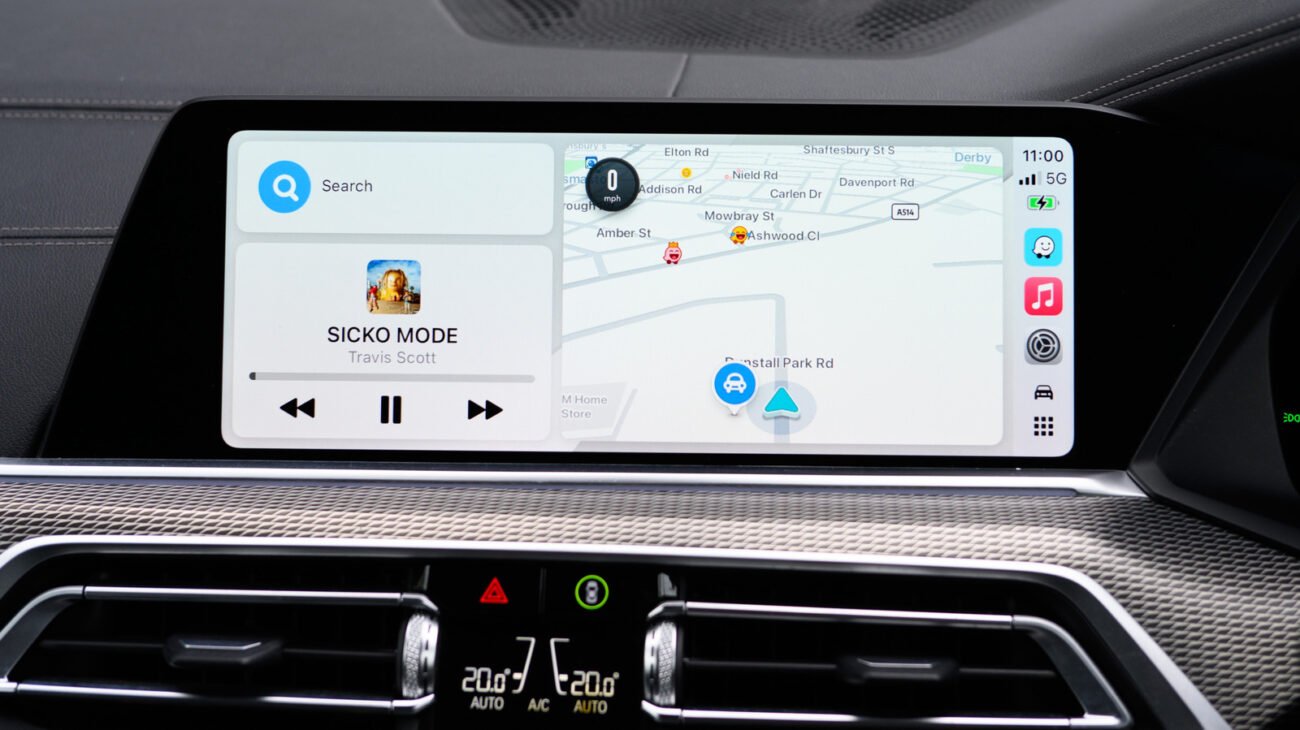
Technical Specifications and Architectural Breakdown
The efficacy of Apple CarPlay as a safety tool relies on its ability to act as a seamless conduit between the high-performance computing power of an iPhone and the vehicle’s infotainment display. When a user connects their device, the iOS environment mirrors a simplified, driver-centric interface that prioritizes low-latency data visualization. Under the hood, this relies on the H.264 video encoding standard, which ensures that navigation maps and alert overlays are rendered with minimal frame delay, a necessity when traveling at highway speeds.
The architecture of speed camera and hazard detection within this environment is bifurcated into two primary streams: static database polling and dynamic crowd-sourced telemetry. Navigation applications like Waze and Google Maps utilize background processes on the host iPhone to query cloud-based servers for geofenced coordinates of known speed cameras. When the vehicle’s GPS coordinates intersect with these pre-defined zones, the application triggers a visual and auditory alert through the vehicle’s audio system. This process is optimized to prevent driver distraction; alerts are categorized by severity, with immediate road hazards receiving priority over static enforcement warnings. Furthermore, because Apple CarPlay leverages the iPhone’s internal sensor suite—including the accelerometer and gyroscope—it can verify vehicle speed against the posted limit data provided by the navigation service, offering a secondary layer of safety validation.
Industry Landscape and Competitive Comparison
The landscape of automotive navigation is currently defined by a tension between proprietary OEM systems and third-party smartphone integration. While vehicle manufacturers continue to invest in embedded navigation, the rapid update cycle of mobile applications ensures that systems like Apple CarPlay remain superior in terms of real-time data accuracy. The following table outlines the functional capabilities of the current market leaders when utilized via the CarPlay interface.
| Platform | Alert Frequency | Crowd-Sourced Data | UI Complexity |
|---|---|---|---|
| Waze | High | Extensive | Moderate |
| Google Maps | Moderate | Moderate | |
| Apple Maps | Low | Limited |
Waze remains the industry benchmark for dynamic enforcement tracking. Its architecture relies on a “wisdom of the crowd” model, where millions of users provide real-time verification of police presence and mobile speed traps. In contrast, Google Maps—which shares data infrastructure with Waze—offers a more conservative approach, focusing on long-term traffic patterns and fixed-camera locations. Apple Maps, while gaining ground with recent updates, maintains a minimalist philosophy that prioritizes route clarity over granular enforcement alerts, catering to users who prefer a less cluttered driving experience.
Practical Consumer & Enterprise Takeaways
For the average consumer, optimizing Apple CarPlay for safety requires a proactive approach to configuration. It is a common misconception that settings adjusted within the app on the phone will immediately reflect on the vehicle display. To ensure stability, users should configure their alert preferences—such as distance thresholds for speed camera notifications and auditory warning volumes—while the phone is disconnected from the vehicle’s head unit. Once the preferences are saved, the subsequent connection session will pull the updated configuration from the application’s cache.
Enterprise fleet managers should also consider the implications of these tools. Providing drivers with standardized navigation protocols can reduce incident rates and improve adherence to local traffic regulations. However, there is a trade-off: the constant stream of alerts can lead to “notification fatigue,” where drivers become desensitized to warnings. Fleet administrators are encouraged to set navigation apps to “Alerts Only” mode, which suppresses non-essential route updates and focuses solely on safety-critical information, such as speed traps or road obstructions.
Frequently Asked Questions
Why do my navigation alerts sometimes fail to trigger on the CarPlay display?
Alert failures are typically caused by background process limitations in iOS or outdated application cache. Ensure that your navigation app has “Always Allow” permissions for Location Services and that the app is not being throttled by the iPhone’s battery optimization settings. If issues persist, disconnecting and reconnecting the device forces a refresh of the CarPlay session data.
Is it legal to use crowd-sourced enforcement alerts while driving?
The legality of using apps that display speed camera locations varies by jurisdiction. While most regions permit the use of navigation software, some countries in Europe have strict regulations against devices that actively detect or warn of speed enforcement. Users should always verify local traffic laws before enabling these features in international territories.
How can I report a speed trap safely while using CarPlay?
Most platforms, specifically Waze, offer a “Report” button on the primary navigation screen. To maintain safety, use voice commands where possible or ensure that the report is submitted only when the vehicle is stationary. Avoid interacting with the touch interface for extended periods while the vehicle is in motion.
The Bottom Line
Apple CarPlay has successfully bridged the gap between complex digital navigation and the physical requirements of safe driving. By acting as an intelligent interface for crowd-sourced data, it provides drivers with a level of situational awareness that was previously unattainable. While no software can replace the necessity of attentive driving and adherence to speed limits, the integration of these alert systems is a net positive for road safety. As these platforms continue to evolve, the focus must remain on reducing cognitive load, ensuring that the technology serves to inform the driver rather than distract them.
